
Guides TikTok transcript
Get a TikTok transcript from a saved video.
Turn what’s said in a saved TikTok video into text you can copy. This guide from Takes for Mac uses Whisper on your Mac, not an upload.
Original sample · 8 seconds
tiktok.txt · WHISPER OUTPUT
Fill the cup with warm water Wait 3 minutes before you drink it
Three steps
From video file to copyable text.
-
Start with a saved video
Put your original or a copy you’re allowed to save in Downloads. Check that you can hear the speech in QuickTime Player.
-
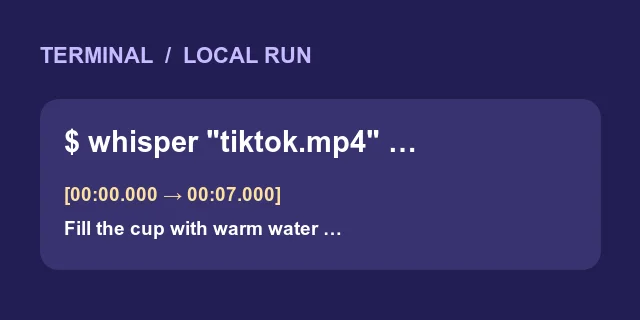
Run Whisper in Terminal
Use the command below on the MP4 or MOV. The first run needs internet to download the speech model.
-
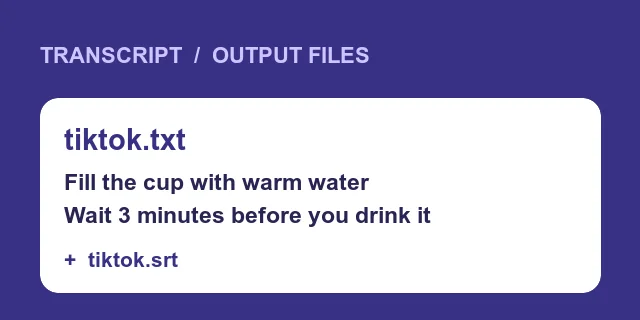
Open and copy the text
Open the TXT file in the
transcriptfolder with TextEdit. Check names and numbers against the audio, then select and copy what you need.
Run it on your Mac
With Homebrew set up, install OpenAI Whisper and FFmpeg once. No Takes install, account or API key needed.
brew install openai-whisper ffmpegTry the sample MP4 or put your own file in Downloads. Replace tiktok.mp4 with its exact name, keeping the quotes.
cd ~/Downloads
whisper "tiktok.mp4" --model base.en --language English --fp16 False --output_dir "transcript" --output_format all
This example is for English speech. Once the model is downloaded, Whisper reads your video locally. The original file stays unchanged.
Look in Downloads → transcript for the TXT and SRT. Whisper also writes VTT, TSV and JSON. To make only text, change all to txt.
Compare the sample’s actual TXT and actual timestamped SRT. Whisper wrote “3” for “three” and left out punctuation.
Keep clips with the same name in separate output folders so Whisper doesn’t overwrite an earlier transcript.
Pick the right text
Transcript, subtitles or description?
| What you want | What to use |
|---|---|
| Spoken transcript | Copyable words from the audio, without timecodes. Use the TXT for notes, quotes or a script. |
| Subtitles | Text with start and end times. Use the SRT in a player or editor that accepts it. It doesn’t change the video. |
| TikTok description | The written text and hashtags below the post. The audio transcript doesn’t contain that text. |
Want the words permanently visible in the video instead? See how Takes burns in captions.
Only have a TikTok link?
A pasted URL won’t work here. This guide starts with a local file and doesn’t download from TikTok or access your account.
Missing or garbled words?
Check for a real voice track first. If music covers the speech, try the original recording before the music was added. Review subtitle timing before using the SRT.