
CarouselsMake a carousel from a session's pictures. Edit the text on the slide, then export for Instagram, a LinkedIn PDF or TikTok photos.
Takes Changelog
Takes changelog
Every release of Takes for Mac, newest first, with pictures. Takes updates itself, so you get each one with one click.
23releases
Oct 29latest
1 clickto update
New · 2026.10.29
Carousels, a full search page and effects
Latest · 29 October 2026
Takes 2026.10.29
Carousels, a search page, effects, Plan on the iPhone and a calmer notch.
A search pagePress ⏎ in ⌘K for a full page of results. Each clip shows in its own shape, with its size and length.
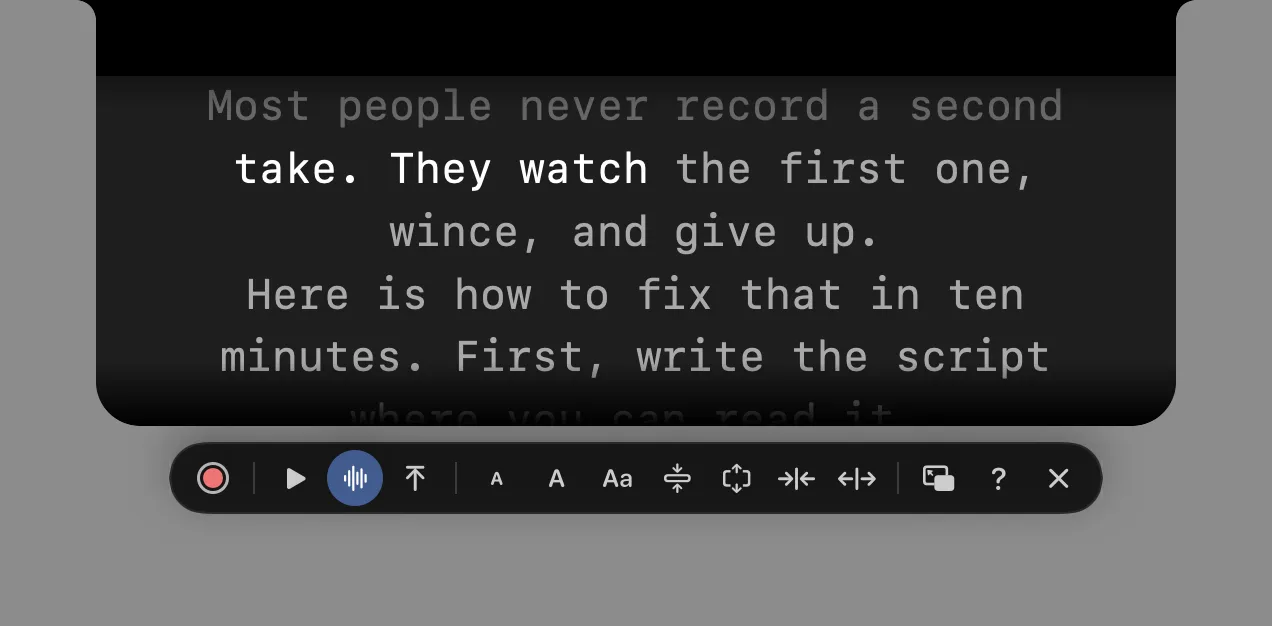
A calmer notchWhile you record, the notch shows only your words until you point at it.
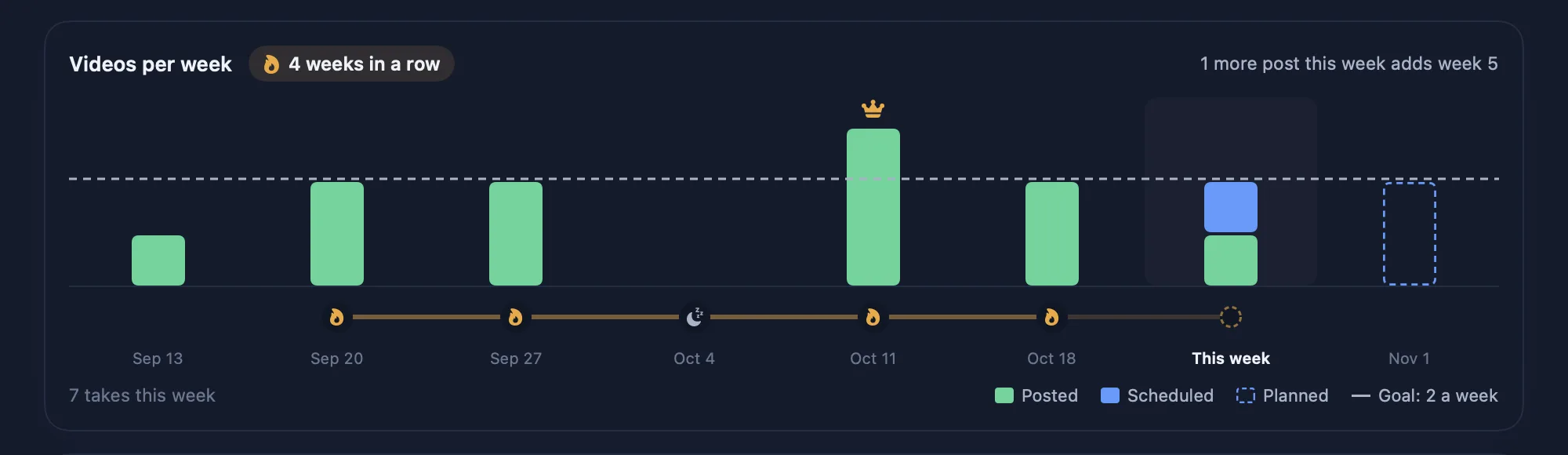
Plan on the iPhoneThe streak chain, the weeks, Change days and the Plan chat, now on your phone too.
EffectsSix effects on a new Effects tab, each in all four shapes. Type @ in the chat to add one.
Earlier releases
October, one release at a time.
The changes you will notice, picked from each release's notes. A second release on the same day gets a .2 or .3.
-
WelcomeHelpChat
- A new four-page welcome shows what Takes does and how it looks.
- Help › Takes Help opens a short guide and the list of shortcuts.
- Commands the agent leaves running show under the chat, each with a Stop button.
-
ExportChatRough cut
- Export an edit to DaVinci Resolve or Premiere (FCPXML, Premiere XML or EDL).
- The chat draws tables, headings, numbered lists, code and quotes.
- Korean ums (음, 어) count as filler words too.
-
Screen pillChatSpeed
- The screen pill: a small record bar over every app. Pick a window or the whole screen.
- Type @ in the chat for a list of your styles, skills and files.
- Claude Code answers about 1 second faster per message, and cuts encode on the Mac's video chip.
-
SkillsFirst launch
- Skills are public, with the HyperFrames pack for motion graphics.
- The first launch opens full screen.
-
AgentsDownloadAssets
- Chat with pi, a third agent next to Claude Code and Codex.
- A smaller download: a tighter .dmg and a stripped app.
- A PDF opens on the stage, not in Preview.
-
AgentsPlanReview
- Pick the agent and model (Claude Code or Codex) in Settings › Agents.
- Plan keeps a week streak, with rest weeks and a Sunday recap.
- Each edit is checked against its take before you see it.
-
PlanStoryboardPrivacy
- Pick your posting days: slots, a buffer and a streak, with videos you drag on the calendar.
- Record on a storyboard shot opens that shot, and the camera comes on before the count.
- Usage counts are opt-in and anonymous, and never include your chats.
-
iPhoneAI videoFeedback
- The iPhone app gets search, styles, the B-roll and Sound pages, and post scheduling.
- A model browser for AI video and images, with each model's price and speed.
- Your comments on edits turn into rules and checks for the next video.
-
TranscriptsUpdateStyles
- Every take gets a transcript, made on your Mac.
- What's new lists every release you skipped.
- Magazine ships as a default style, and the notch opens your script when you record.
-
PrompterSearchUpdate
- The prompter follows your voice and sits in the notch.
- ⌘K gets filter chips: All, Takes, Edits, B-roll, Stills and Scripts.
- Takes finds newer releases on GitHub by itself.
-
SearchVoiceAI video
- Search your footage by meaning in ⌘K, on your Mac.
- ElevenLabs voices: a voice-over, fix a word, or change the voice.
- Make and change videos and images inside Takes, and storyboards in any shape.
-
PostChat
- Pick the cover per platform on the Post tab.
- What you type in the chat stays through tab switches and a quit.
- Esc no longer takes the window out of full screen.
-
First release
- The first public release: record takes, and let Claude Code storyboard, edit and post them.
- Tab switches got two to three times faster in the .2.
How to update
Takes tells you when a release is ready.
- Takes checks for a new releaseAt launch and every six hours.
- It downloads in the backgroundYou keep working while it waits.
- The sidebar says Update TakesUnder it, "N changes" opens What's new.
- Read What's newIt lists every release you skipped, not only the newest.
- Click Update TakesTakes waits until nothing records or runs, then opens again.
Three ways
Update in the app, in Terminal or by hand.
| Update Takes button | The install line again | Download the .dmg | |
|---|---|---|---|
| How | One click in the sidebar | curl -fsSL gettakes.app/install | bash | Drag Takes to Applications |
| Shows what changed | What's new | No | Notes on GitHub |
| Also installs what is missing (ffmpeg, an agent) | No | Yes | No |
| macOS asks once | No | No | Yes: click Open Anyway |
| Best for | Most updates | A broken setup | Going back to an older release |
Get started
Paste one line, or download.
The line installs Takes and ffmpeg, finds your agent (Claude Code, Codex or pi) or installs Claude Code, signs you in and opens the app. Run it again to update. Rather click? Download the .dmg, drag Takes to Applications, then click Finish setup in the sidebar.
NeedsApple silicon, macOS 15+, and an agent on your own plan for the AI parts: Claude Code, Codex or pi.
First time with the .dmg?macOS asks once. Click Open Anyway in Privacy & Security. The download page shows where.
Free and openMIT licensed. Read the code on GitHub.
Questions
Release questions.
How often does Takes release?
Often: 23 releases in October 2026, from the first public one on 4 October to 2026.10.29. Some days have two or three; those get a .2 or .3.
How do I update Takes?
Click Update Takes in the sidebar when it shows. Takes asks gettakes.app for the newest release at launch and every six hours, and downloads it from GitHub in the background.
What does the version number mean?
It is the release date: 2026.10.29 shipped on 29 October 2026. A second release that day is 2026.10.29.2.
I skipped a few releases. What did I miss?
Click the changes count under Update Takes. What's new lists every release since yours, not only the newest. This page has the same list.
Does an update keep my takes and sessions?
Yes. Your library is a folder in Movies, outside the app. An update swaps only the app, and it waits until nothing records or runs.
Can I go back to an older release?
Yes. Each release on GitHub keeps its own Takes.dmg. Download it and drag Takes to Applications.
How do I hear about new releases?
Watch the GitHub repo for releases, or add its feed, github.com/marvtub/takes-public/releases.atom, to your reader. Takes itself also tells you in the sidebar.
Is Takes free?
Yes. Takes for Mac is free and MIT licensed. The AI parts run on your own agent plan: Claude Code, Codex or pi.
Where are the full release notes?
On GitHub, one page per release. This page picks the changes you will notice.
More about Takes