Takes Riverside alternative

A free Riverside alternative for solo creators.

Takes for Mac is free and records you with a teleprompter. No watermark, no hour cap. Then ask for the edit.

Download .dmg

macOS 15+ · Apple silicon · free

RecordingSaved on your Mac

The short answer

Three things to know first.

Free, with no watermark

No plan, no trial, no hour cap. The AI edits run on your own agent plan, so Claude or ChatGPT users pay $0 more.

Made for one person

Riverside is a studio for guests. Takes is for you alone, talking to the camera from a script.

Files stay on your Mac

Each take is a plain .mov in a folder. No upload, no cloud, no account.

At a glance

Riverside and Takes, side by side.

Riverside

  • ✓Remote guests in the browser
  • Free plan: 720p, a watermark
  • Pro is $29 a month

Takes for Mac

  • ✓Made for one person
  • ✓Full size, no watermark
  • ✓Free and open source

What it costs

What it costs each month.

The smallest Claude or ChatGPT plan runs Takes. No Max plan needed.

Takesyou already pay for Claude or ChatGPT$0every feature · no watermark
Takes + Claude Prothe smallest plan, billed yearly$17$20 month to month · no Max plan needed
Riverside Free$0720p · a watermark · 2 recording hours once
Riverside Probilled yearly$24$288 a year
Riverside Promonth to month$29cancel any month

Riverside prices from riverside.com/pricing, 22 October 2026. Claude Pro is $20 a month, or $17 billed yearly. ChatGPT Plus with Codex is $20 a month.

How

From one take to every version, alone.

  1. 1Record yourself

    Press ⌘R. Full size, on your Mac.

  2. 2Read your script

    It follows your voice. No co-host needed.

  3. 3Ask for the edit

    Plain words. No timeline.

  4. 4Get each version

    16:9 and 9:16, saved on your Mac.

Less work

Two sentences, not ten clicks.

The same job: a tight 9:16 clip with captions, then the post.

Timeline editor 10 steps

  1. Import the take
  2. Drag it to the timeline
  3. Find and cut each pause
  4. Run auto captions
  5. Remove the filler words
  6. Fix the caption style
  7. Set 9:16
  8. Reframe on your face
  9. Export
  10. Write the caption

Takes 2 messages

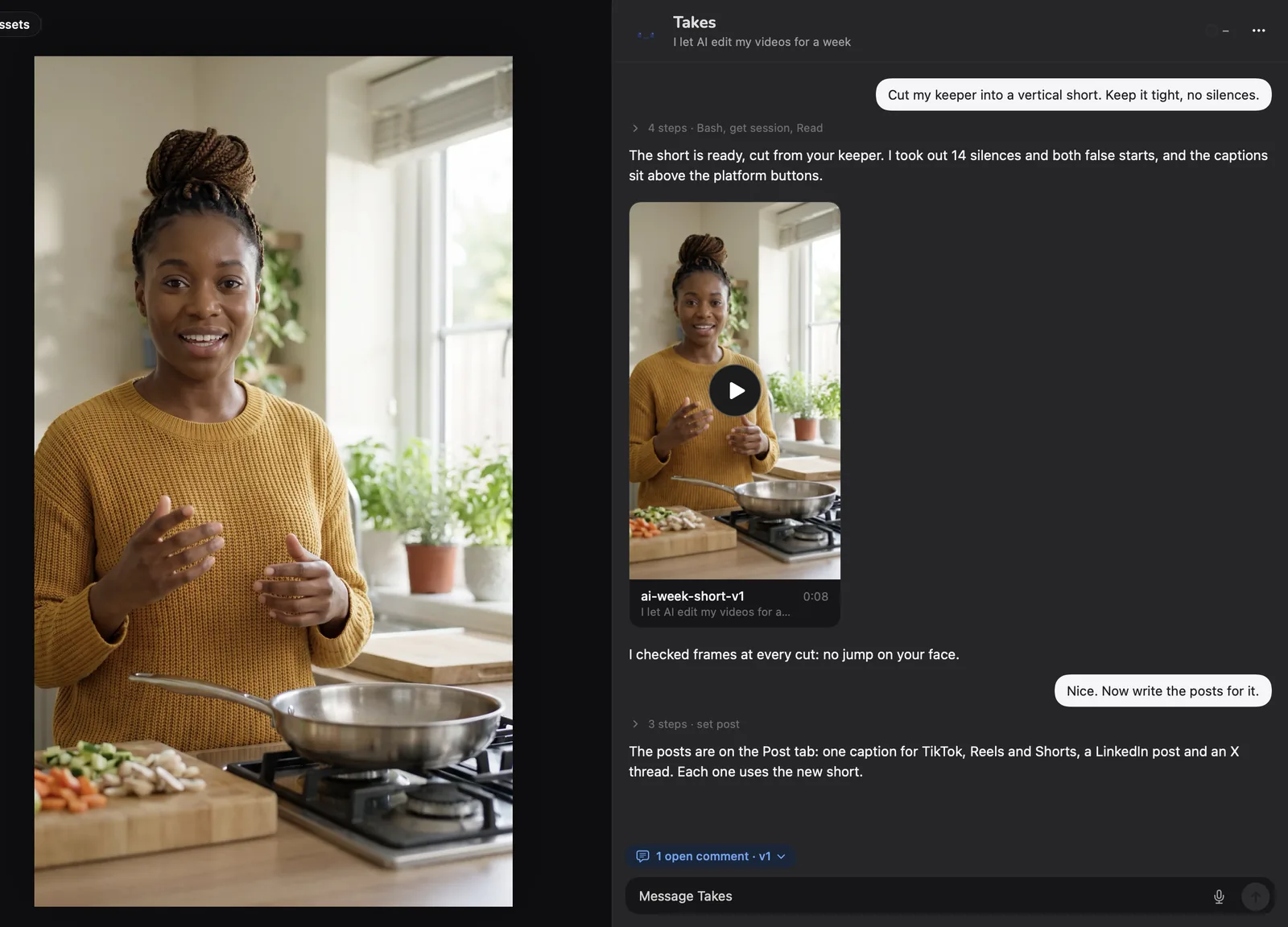
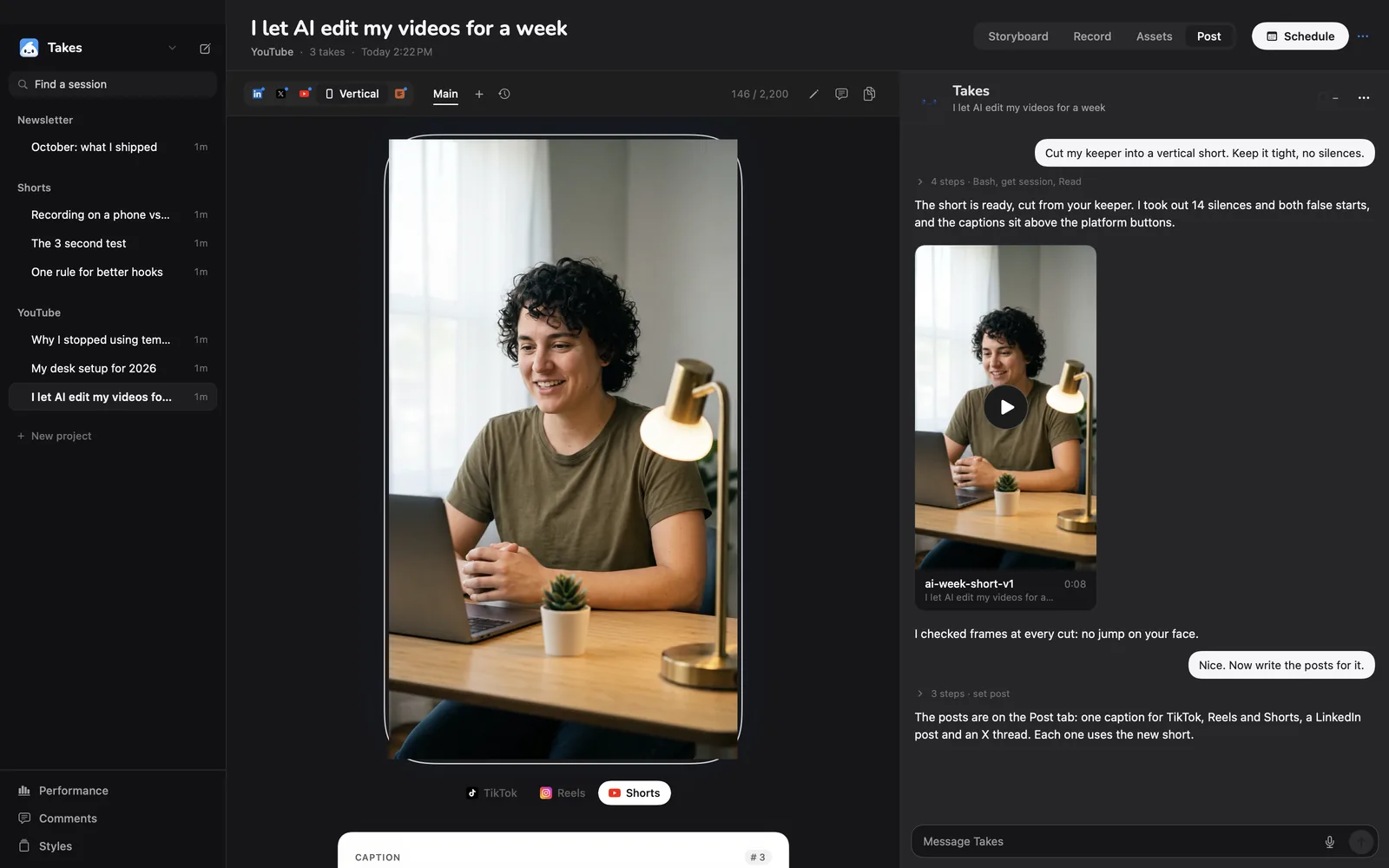
  1. "Cut my keeper into a vertical short. Keep it tight, no silences."
  2. "Now write the posts for it."
8 minfrom the last word of a real take to the first cut (3:18 → 1:24, 36 pauses out)
The Takes window: the short on the left, the chat on the right. The ask is 'Cut my keeper into a vertical short. Keep it tight, no silences.' Takes answers that it took out 14 silences and both false starts, shows the short, then writes the posts.
The real Takes window. You ask on the right, the video plays on the left.

A real video

What "ask for the edit" looks like.

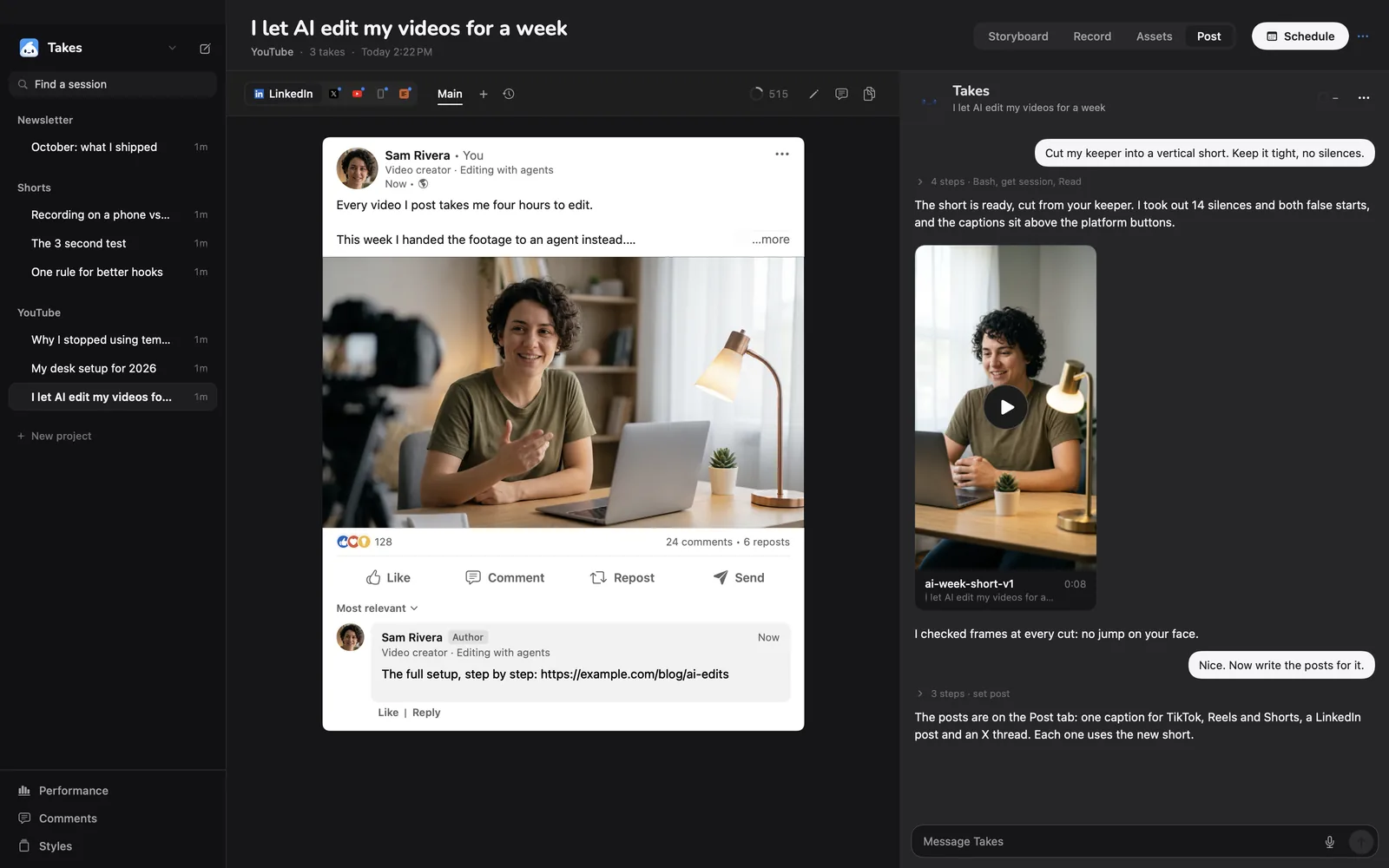
The maker of Takes made this LinkedIn video in Takes on October 1, 2026. Claude Code did every cut. The full story, step by step.

14 seconds of the finished video, with a note on the frame and the fix.
3:18raw take
36pauses cut
1:24first cut
27notes, in words
9versions
0timeline drags

Some of the real notes

  • v3 · 0:14"I stutter here a little, any chance you can correct?"
  • v4"Too many stuttery pauses, please cut."

What you get

Everything a solo creator needs.

A teleprompter that listens

It scrolls as you talk and waits when you stop.

No hour cap

Full size, straight to a folder on your Mac.

Restarts cut for you

Ask once. The ums and retakes go.

Captions in your style

Burned in, low, clear of your face.

9:16 on your face

The vertical crop follows you.

Free, no watermark

MIT licensed. No account, no trial.

Post

Then it writes the posts.

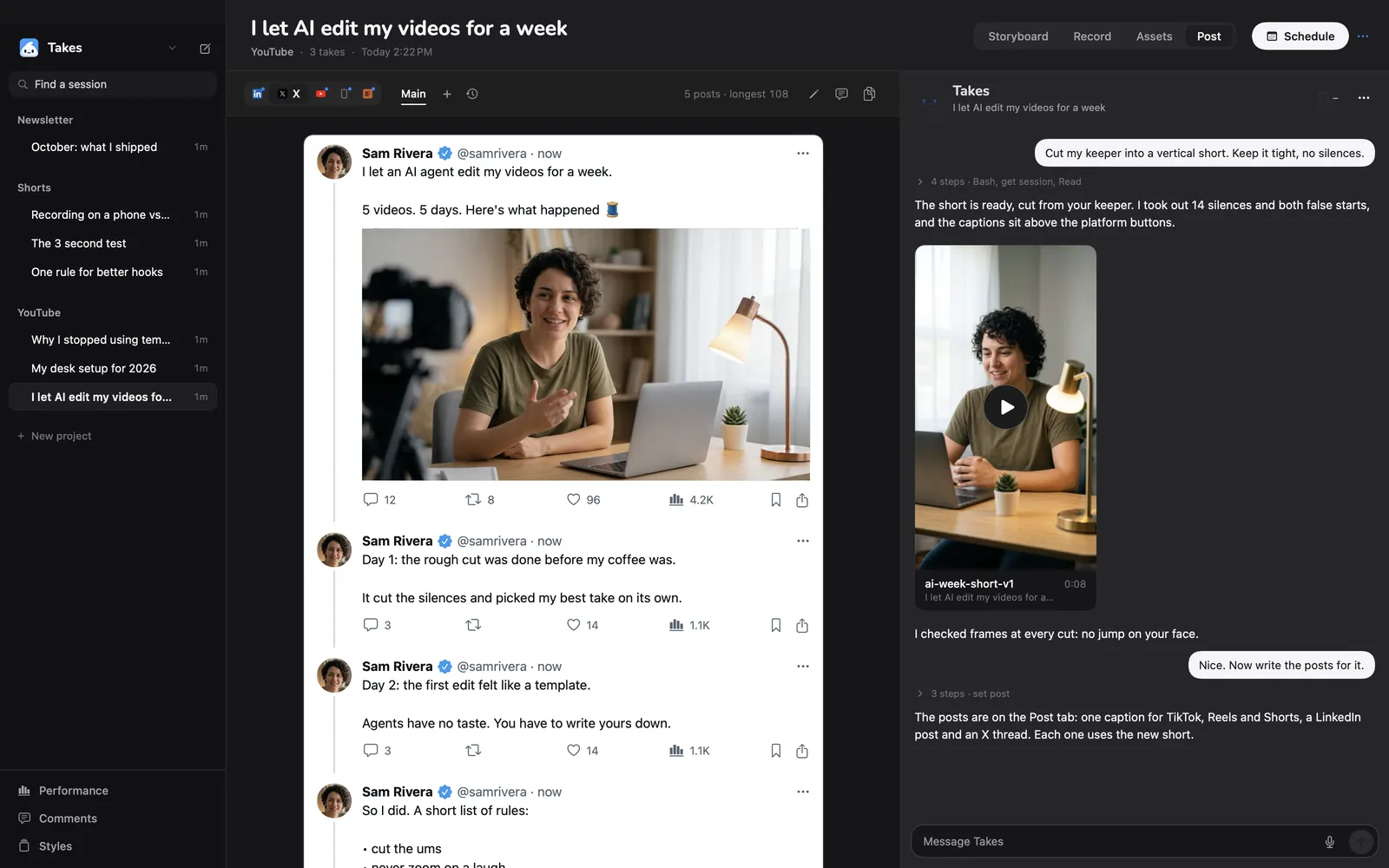
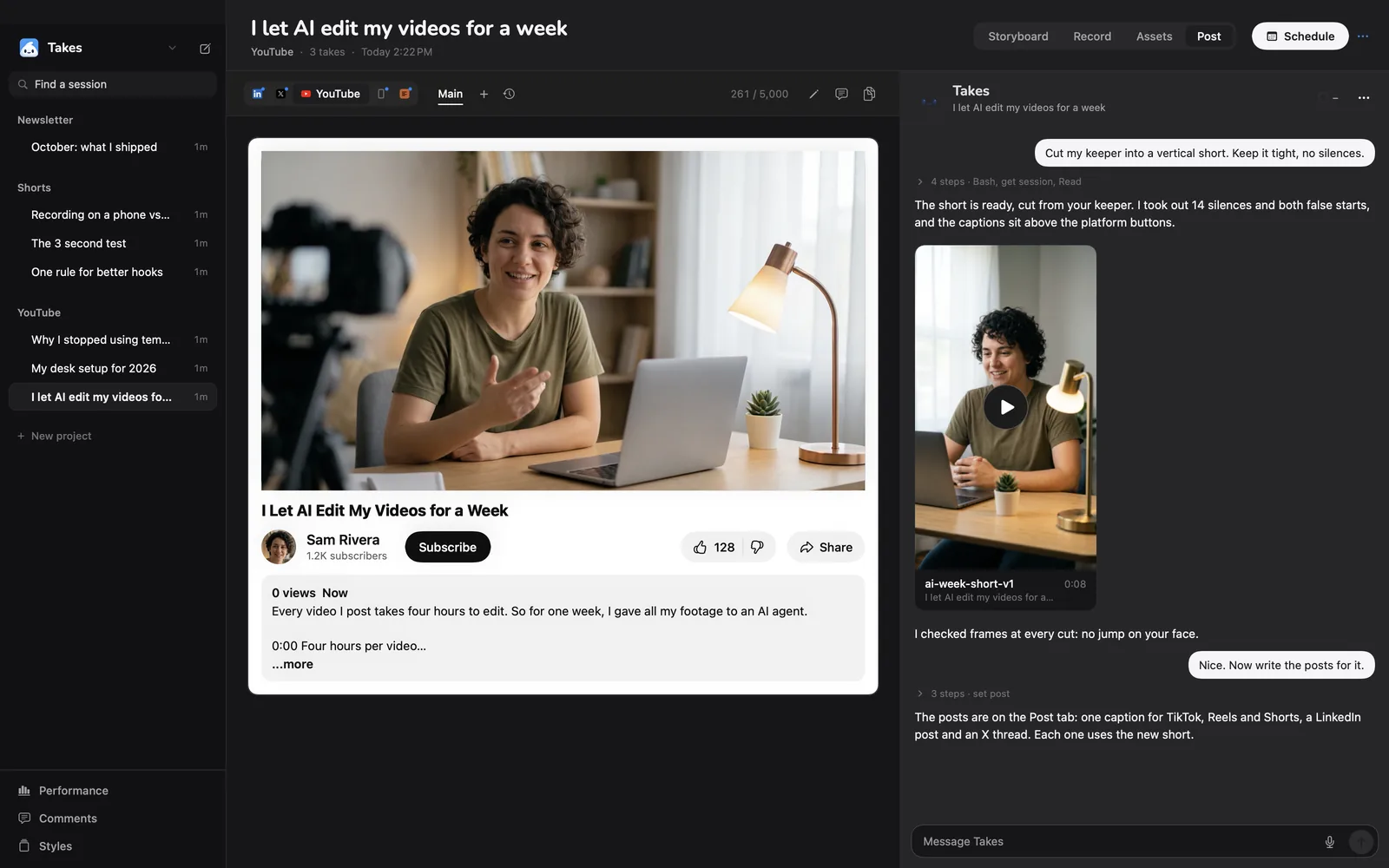
LinkedIn, X, YouTube and Shorts, each shown as it will look.
Takes · Post
The Post tab in Takes: the vertical short with its caption, as TikTok shows it The Post tab in Takes: a LinkedIn post with the video, as LinkedIn shows it The Post tab in Takes: an X thread with the video The Post tab in Takes: the YouTube title, description and thumbnail

Compare

Takes, Riverside, Descript and CapCut.

Takes for MacRiversideDescriptCapCut
PriceFree, open source (MIT)Free plan; Pro $29 a month ($24 yearly)Free plan; from $16 a monthFree plan; $9.99 or $19.99 a month
Free plan limitsNone. Your disk720p, a watermark, 2 recording hours once720p exportSome tools paid
Remote guestsNo, one personYesYes, in RoomsNot stated
TeleprompterFollows your voiceYes, for the host on ProScrolls at a set speedIn the phone app
How you editAsk in wordsText editing, plus an AI agentTranscript editingA full timeline
Where files liveA folder on your MacRiverside's cloudDescript's cloudDevice, plus paid cloud
Runs onMac, Apple siliconBrowser, Mac app, phonesMac, Windows, webMac, Windows, web, phones

Sources: riverside.com/pricing, our Descript page and our CapCut page, checked 2026-10-22; Takes from its code.

Be honest

Who should stay on Riverside.

Takes fits you if…

  • you record alone, to the camera, from a script or notes
  • you want full size with no watermark, free
  • you want a clean cut with captions, with no timeline
  • you want your files on your Mac, not in a cloud

Stay on Riverside if…

  • you record guests from afarTakes records one person.
  • you need Windows or a phoneTakes is a Mac app.
  • you want to record in the browserTakes needs an install.
  • you want $0 and do not use an AI agentRiverside Free needs no plan.

Get started

Paste one line, or download.

One line installs Takes and sets it up. Or download the .dmg.

Download .dmg
NeedsApple silicon, macOS 15+, and Claude Code, Codex or pi.
First time with the .dmg?macOS asks once: click Open Anyway in Privacy & Security.
Free and openMIT licensed. Read the code on GitHub.

Questions

Riverside alternative questions.

Is there a free alternative to Riverside for solo creators?

Yes. Takes for Mac is free (MIT): no watermark, no hour cap. Riverside Free is 720p with a watermark; Pro is $29 a month.

Can Takes record a guest?

No, one person only. Pick Riverside for remote guests.

Is the quality as good as Riverside's?

It records straight to your Mac at full size, so it is as good as your camera and mic.

Does Takes have a teleprompter?

Yes. It follows your voice as you read.

What does Takes need?

Apple silicon, macOS 15+, and an agent on your own plan: Claude Code, Codex or pi.

More about Takes

One app, from script to post.

Copied. Paste it in Terminal.