The app is free
No plan, no media hours, no watermark. The AI edits run on your own Claude plan. If you already pay for Claude, Takes adds $0.
 Takes
Takes
Takes Descript alternative
Takes for Mac is free and open source. It records you with a teleprompter that follows your voice, then cuts the ums and pauses when you ask, and keeps every file on your Mac. It is not a full Descript: it is for one person who talks to a camera.
So, um, today I want to, uh, I want to show you like my whole video workflow … in one app.
The short answer
No plan, no media hours, no watermark. The AI edits run on your own Claude plan. If you already pay for Claude, Takes adds $0.
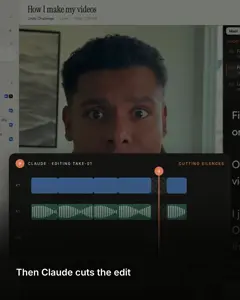
Descript edits by text. Takes edits by asking: "cut the ums", or a note on the frame. Claude makes a new version.
Every take, edit and post is a plain file in a folder. Nothing goes up to a cloud drive. No Takes account.
What it costs
Descript counts media hours: what you upload or record each month. Takes has no limit, only your disk. Descript prices are yearly billing, from descript.com/pricing.
Month to month, Descript is $24, $35 and $65. Claude Pro is $20 a month. Prices change: check each site before you buy.
How you edit
This is the real difference. Both cut the same ums. You pick the way that suits you.
The transcript is the editor. Delete a word and the video follows. Good when you want to choose every cut by hand.
Ask in the chat, or leave a note on a time and a spot in the frame. Claude Code cuts a new version. You never touch a timeline.
A real video
Marvin made this LinkedIn video in Takes on October 1, 2026. Claude Code did every cut. The full story, step by step.
Some of the real notes
Side by side
| Takes for Mac | Descript | |
|---|---|---|
| Price | Free, open source (MIT). AI edits on your Claude plan | Free plan; paid from $16 a month (yearly) |
| Limits | None. Your disk | 1 to 40 media hours a month, by plan |
| Export | Full size, no watermark | 720p on Free; 1080p or 4K, watermark-free, on paid plans |
| Teleprompter | Follows your voice; in the notch or its own window | Scrolls at a set speed; can flip for a rig |
| Records | Camera, or camera + screen as two synced files | Camera and screen; remote guests in Rooms |
| How you edit | Ask in words, or a note on the frame | Delete words in the transcript, plus a timeline |
| Cut ums and pauses | Yes, when you ask | Yes, Remove Filler Words |
| Captions | Yes, burned in, in your style | Yes, on all plans |
| 9:16 clip | Yes, framed on your face | Yes |
| Voice cleanup | Basic: ffmpeg noise and loudness filters | Studio Sound, stronger on a bad room |
| Eye contact, AI voice | Fix a word in your voice with your own ElevenLabs key; no eye contact | Eye Contact and AI Speech (Overdub) |
| Post drafts | LinkedIn, X, YouTube, Shorts, each as it will look | Not stated |
| Teams | No, one person | Up to 5 seats on Business |
| Where files live | A folder on your Mac | Descript's cloud: 5 GB to 2 TB by plan |
| Account | No Takes account (Claude sign-in for AI) | Descript account |
| Runs on | Mac only: Apple silicon, macOS 15+ | macOS 14+, Windows 11, the web |
Descript facts from descript.com/pricing, /download and the teleprompter help page, 8 October 2026. Takes facts from its source.
Be honest
.mov and .mp4 files. Record with the Takes teleprompter, let Claude cut the rough version, then polish it in Descript or any editor.
Free and open source
People also search for an open-source Descript alternative on GitHub. Here are the ones we found, from their own launch posts. We did not test them.
The real thing, with limits: 60 media minutes a month, 100 AI credits one time, 720p export. Good to learn Descript before you pay.
A Mac app that edits a video by its transcript, with Whisper on your Mac. It can delete all filler words and gaps. Launch post.
Edit a video by editing the transcript, all in the browser, offline. Its maker calls it a tech demo, not a full replacement. GitHub.
Get started
It installs Takes, ffmpeg and Claude Code, signs you in and opens the app. Run it again to update.
Questions
Yes. Takes for Mac is free and open source (MIT). It records talking-head videos with a teleprompter, and Claude Code cuts the pauses and ums, adds captions and makes the 9:16 clip when you ask. The AI parts run on your own Claude plan (Pro or Max). Other free options: Descript's own free plan (1 media hour a month, 720p export), ScriptEdit (a free Mac app that edits by transcript) and Rescript (open source, runs in the browser).
Descript has a free plan with 60 media minutes a month, 100 AI credits one time and 720p export. Paid plans start at $16 a month billed yearly (Hobbyist, $24 month to month) and export without a watermark. Checked on descript.com/pricing on 8 October 2026.
Takes is open source under the MIT license, on GitHub. It is a Mac app for recording and editing talking-head videos. Rescript is an open-source browser app that edits a video by editing its transcript. Neither is a full copy of Descript.
No. In Descript you delete words in the transcript and the video follows. In Takes you ask in plain words, for example "cut the ums and the restart at 0:14", or you leave a note on the frame, and Claude Code makes a new version. If you like to edit by text, Descript is the better tool.
Whisper writes down every word with its time, ffmpeg cuts each um inside the silence around it. In Takes you ask: "cut the ums, the long pauses and the restarts." Claude keeps your last clean try of a line and checks still frames of the result. You can also do it by hand with the free takes-video-edit skill.
In Takes, Claude can clean up the voice with ffmpeg filters: less noise and hum, even loudness. It is not as strong as Studio Sound on a bad room. If your sound is often poor, Studio Sound is better, or record with a good mic.
Yes. Descript has a teleprompter in its recorder. It scrolls at a speed you set, can flip the text for a glass rig, and the desktop app keeps it out of the recording. The Takes teleprompter follows your voice, so it waits when you pause.
Takes keeps every take, edit and post as plain files in a folder on your Mac. Recording needs no internet. The AI edits need Claude Code, which talks to Anthropic; the cutting itself (ffmpeg and Whisper) runs on your Mac. There is no Takes account and no upload limit.
Yes. Takes saves normal .mov and .mp4 files. Record in Takes with the teleprompter, let Claude make the rough cut, then open the file in Descript, or any editor, for the final polish.
No. Takes is a Mac app for Apple silicon and macOS 15 or later. Descript runs on macOS 14 or later, Windows 11 and the web.
The maker of Takes, so read it with that in mind. Every Descript fact comes from descript.com, checked on 8 October 2026, and we name where Descript is better. If something is wrong, tell us in Discussions.
More about Takes