

Step by step
Schedule a post on LinkedIn, in 5 steps.
On a computer. The phone app works the same: tap Post, then the clock icon in the upper-right corner.
- Click Start a postAt the top of your LinkedIn home page.
- Write the postAdd a video, a picture or a document if you want. Up to 3,000 characters.
- Click the clock iconIn the lower-right corner, next to Post.
- Pick a date and timeFrom 10 minutes to 3 months ahead.
- Click Next, then ScheduleLinkedIn posts it at that time by itself. Your computer can be off.
The rules
What you can schedule, from a profile or a Page.
| Your profile | A company Page | |
|---|---|---|
| Who can schedule | You | Super admins and content admins |
| How far ahead | 10 minutes to 3 months | 1 hour to 3 months |
| Video posts | Yes | Yes |
| Cannot be scheduled | Events and jobs | Events, multiple photos, reshares, polls, jobs and service posts |
| Change it later | Modify schedule, Edit post or Delete | Reschedule, edit or delete |
Sources: LinkedIn Help, Schedule posts and Schedule a LinkedIn Page post. Checked 30 October 2026.
Find them again
Where your scheduled posts are.
- Wed, 4:00 PMModify schedule · Edit post
- Fri, 3:00 PMModify schedule · Edit post
- Tue, 11:00 AMModify schedule · Edit post
See them: click Start a post, then the clock icon, then View all scheduled posts in the lower-left corner.
Change one: click the More icon on the post, then Modify schedule or Edit post. The Delete icon removes it.
On the phone: tap Post, the clock icon, then View all.
When to post
The best time to schedule it.
LinkedIn names no best time. Two large studies did, in each reader's local time. They agree on midweek and disagree on the hour.
The bars show each study's order of days, not exact numbers.
With a video
Schedule a video post from Takes.
This is the real Takes app: the post shows as it will look in the feed, next to the video it goes with.
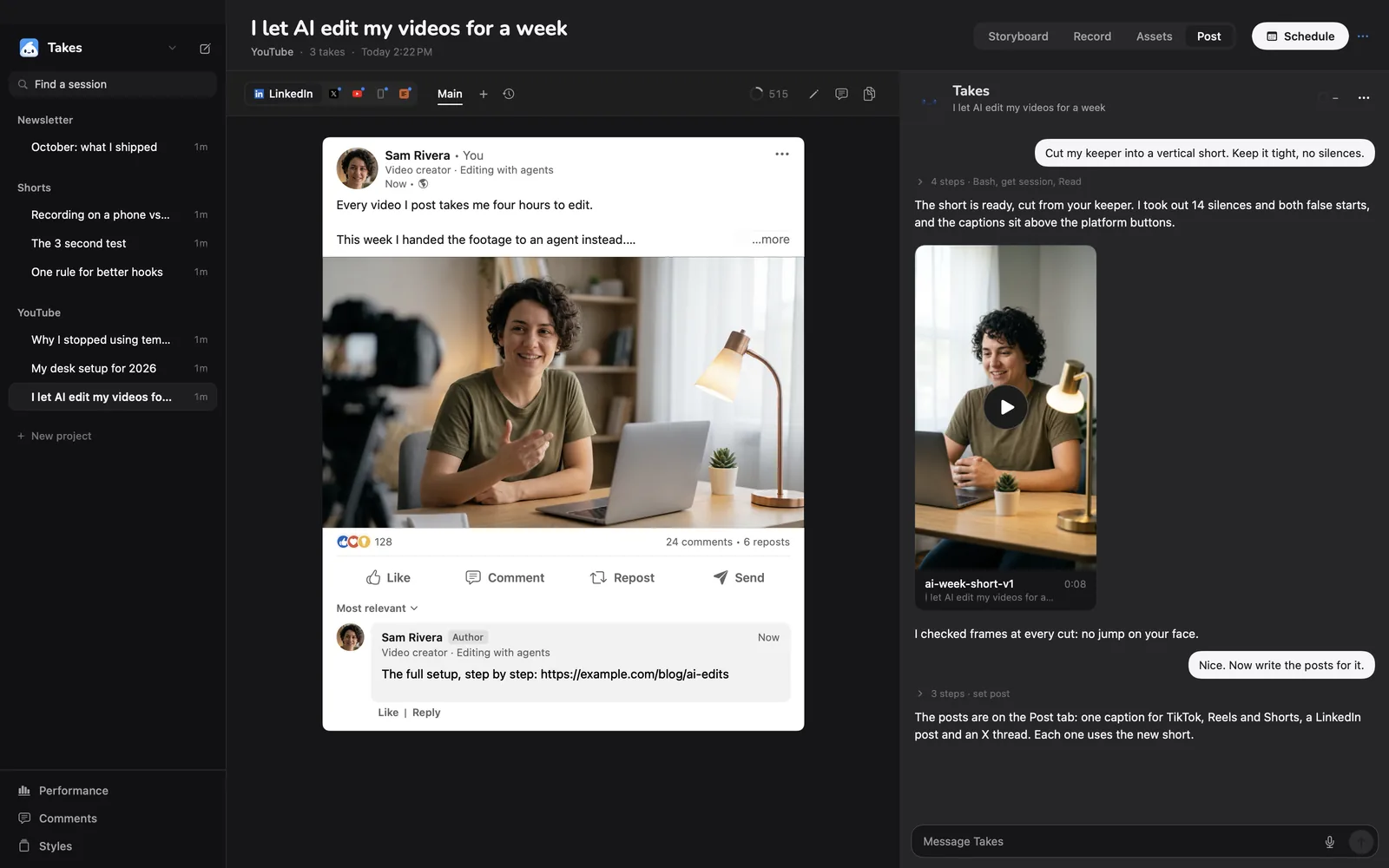
- Get the post with the videoAsk Takes to write it. A counter shows how many of the 3,000 characters you use.
- Press SchedulePick the day, the time and the time zone.
- Say "schedule my posts"Claude Code schedules each ready post with LinkedIn's own scheduler, in your Chrome.
- Change it any timeChange the time or the text, and the post shows "needs update" until it is changed on LinkedIn too.
Your options
Three ways to schedule a LinkedIn post.
| Buffer | Takes for Mac | ||
|---|---|---|---|
| Price | Free | Free for 3 channels, 10 queued posts each; then $5 a month per channel | Free app; the AI runs on your plan (Claude Pro is $20 a month) |
| Posts with your computer off | Yes | Yes | Yes, through LinkedIn's own scheduler |
| X posts too | No | Yes | Yes, through Typefully |
| Records and cuts the video | No | No | Yes, with a teleprompter |
| Works on | Web and phone | Web and phone | Mac with Apple silicon |
Buffer prices from buffer.com/pricing, checked 30 October 2026.
Get started
Paste one line, or download.
The line installs Takes and ffmpeg, finds your agent (Claude Code, Codex or pi) or installs Claude Code, signs you in and opens the app. Run it again to update. Rather click? Download the .dmg, drag Takes to Applications, then click Finish setup in the sidebar.
Questions
Scheduling questions.
How do I schedule a post on LinkedIn?
Click Start a post, write the post, click the clock icon in the lower-right corner, pick a date and time, then click Next and Schedule. In the phone app, tap Post and the clock icon in the upper-right corner.
How far ahead can I schedule a LinkedIn post?
From your profile, 10 minutes to 3 months ahead. From a company Page, 1 hour to 3 months ahead.
Can I schedule a video post on LinkedIn?
Yes. Add the video in the post box, then click the clock icon as for any post. Check the LinkedIn video specs first: 3 seconds to 15 minutes, up to 5 GB.
Where do I find my scheduled posts on LinkedIn?
Click Start a post, then the clock icon, then View all scheduled posts in the lower-left corner. In the phone app, tap Post, the clock icon, then View all.
Can I edit a scheduled LinkedIn post?
Yes. In View all scheduled posts, click the More icon on the post, then Modify schedule for the time or Edit post for the text. The Delete icon removes it.
Why can't I schedule my LinkedIn post?
Events and jobs cannot be scheduled. On a company Page, multiple photos, reshares, polls and service posts cannot be scheduled either. The time must also be at least 10 minutes ahead (1 hour on a Page).
Can I schedule posts on a LinkedIn company Page?
Yes, if you are a super admin or a content admin of the Page. Open the Page admin view, click Page posts, then Start a post and the clock icon.
What is the best time to post on LinkedIn?
LinkedIn names no best time. Buffer's study of 4.8 million posts found weekdays 3 to 8 PM best, with Wednesday 4 PM the strongest. Sprout Social found Tuesday 11 AM to 5 PM best and weekends weakest.
What is the LinkedIn post character limit?
3,000 characters. Takes shows a counter of the 3,000 next to each LinkedIn post it writes.
Is scheduling LinkedIn posts free?
Yes. LinkedIn's own scheduler is free for profiles and Pages. Tools such as Buffer add a queue for many accounts; Takes for Mac is free and uses LinkedIn's scheduler.
Can Takes schedule X posts too?
Yes. Takes writes the X post or thread next to the LinkedIn post, and X posts go out through Typefully.
Who wrote this page?
The maker of Takes, so read it with that in mind. The LinkedIn steps and limits come from LinkedIn's own help pages, checked on 30 October 2026.
More about Takes