
Takes Guides Short video specs

Reels, Shorts and TikTok video size and length

Make it 1080×1920 pixels (9:16) and under 3 minutes, and one video fits all three. Takes for Mac cuts it and writes one caption for TikTok, Reels and Shorts.

1080×1920pixels
9:16ratio
≤ 3 minfits all three
Zones from Meta's and Google's own guides. TikTok gives its zone only as a template file.

The specs

Every size and length, in one table.

From each app's own help pages; "size to use" is the common pick for a 9:16 video. Where an app gives no number, the cell says so.

Instagram ReelsYouTube ShortsTikTok
Size to use1080×19201080×19201080×1920
Ratio1.91:1 to 9:16Square or vertical9:16 recommended
Minimum720 px, 30 fpsNo number given540×960 (ad specs)
Max length20 minutes3 minutesNo single limit given; ads up to 10 minutes
Watch outOver 3 minutes: not shown to new audiencesOver 1 minute with a copyright claim: blockedA web upload keeps the whole video; trim it in the app
Cover420×654 (1:1.55)No number givenNo number given
File sizeNo number givenNo number givenAds: up to 500 MB

Sources: Instagram Help, reel size and record a reel; YouTube Help, upload Shorts and three-minute Shorts; TikTok making a post and video ad specs. Checked 30 October 2026.

How long

Under 3 minutes fits all three.

Shorts stop at 3 minutes, and Reels over 3 minutes reach only your followers. Under 1 minute is safest if your video has music you don't own.

YouTube Shorts3 min
Instagram Reels20 min
TikTokno single limit
3 min

Each app

What each app shows over your video.

The dimmed parts get covered by buttons, your name and the caption. Each frame is drawn to scale from the app's own numbers.

Instagram Reels

  • Safe zone: leave the top 14%, the bottom 35% and 6% on each side free.
  • On 1080×1920: about 269 px top, 672 px bottom, 65 px each side.
  • Length: up to 20 minutes. Over 3 minutes, Reels are not shown to new audiences.
  • Cover: 420×654. You cannot change it after the upload.

Source: Meta Ads Guide, Reels; Instagram Help.
YouTube Shorts

  • Safe zone: leave the top 288 px, the bottom 672 px, the left 48 px and the right 192 px free.
  • Why the right side: the like, comment and share buttons sit there.
  • Length: up to 3 minutes. Over 1 minute with a copyright claim, the Short is blocked.
  • Ratio: square or vertical. 9:16 fills the screen.

Source: Google Ads Help, Shorts safe zone; YouTube Help.

TikTok

  • Safe zone: TikTok gives it only as a downloadable template on its ad specs page, with no numbers in the text. So we draw no zone here.
  • Size: 9:16, at least 540×960 (ad specs). Use 1080×1920.
  • Length: no single limit on its help pages. Ads can be up to 10 minutes.
  • Tip: the button rail is on the right, like Shorts. The overlap below keeps it clear.

Source: TikTok video ad specs.

One video for all three

Keep the face and captions in the overlap.

Take the stricter number from each side, and one frame fits both apps.

On 1080×1920: leave the top 288 px, the bottom 672 px, the left 65 px and the right 192 px free. That leaves about 823×960 px in the middle.

Captions: put them in the lower part of that box, above the 1,248 px line. Below it, the app's own caption covers them.

The bottom third still shows: your shirt or the desk can be there. Keep text and your face out of it.

Export

Export settings that upload clean.

YouTube publishes its upload settings. Instagram asks for at least 30 fps. These work on all three apps.

Size1080×19209:16, vertical. No black bars.
FileMP4With the moov atom at the front (Fast Start).
VideoH.264High Profile, progressive, 4:2:0.
Bitrate8 MbpsYouTube's pick for 1080p at 30 fps. 12 Mbps at 60 fps.
Frame rate30 fpsOr the rate you recorded at. Instagram needs 30 or more.
AudioAAC, 48 kHzStereo. YouTube suggests 384 kbps.

Source: YouTube recommended upload encoding settings; Instagram Help. Checked 4 November 2026.

Common mistakes

Five things that cost views.

Captions at the very bottomThe bottom 672 px get your name and the app's caption. Burned-in captions there are hidden.
Text on the right edgeShorts and TikTok put their buttons there. Keep 192 px free.
A 16:9 video in a 9:16 feedIt plays small, with bars. Record vertical or reframe before you post.
Reels over 3 minutesThey reach your followers only. Cut to under 3 to reach new people.
Music on a long ShortA Short over 1 minute with a copyright claim is blocked. Keep it under 1 minute, or use your own sound.

How to make one

One video, one caption, three apps.

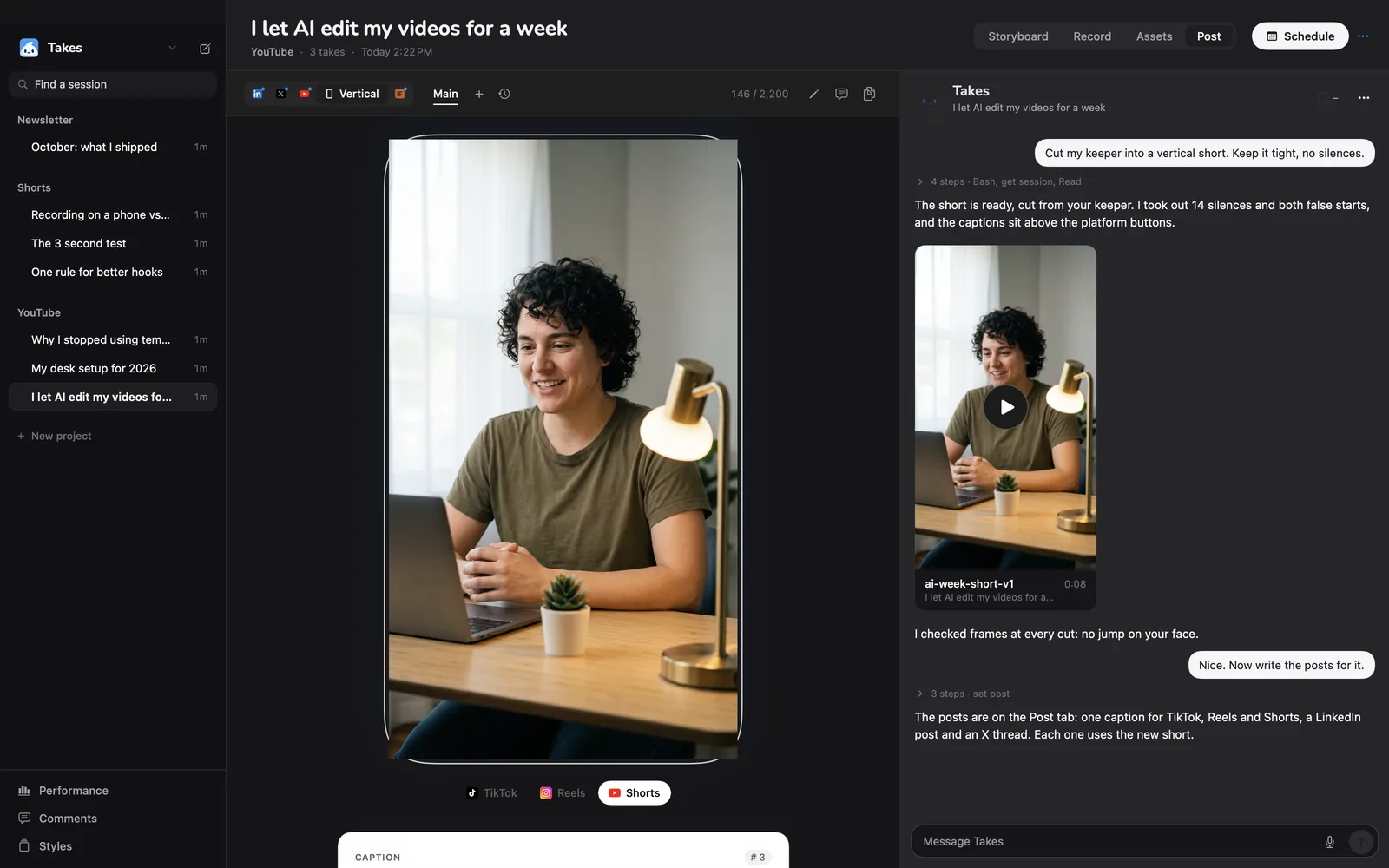
This is the real Takes app: the vertical post shows as it will look on each app, and one caption serves all three.

The Takes Post tab with a vertical video in a phone frame, the TikTok, Reels and Shorts switch, and a 2,200-character caption counter.
The Vertical post: switch between TikTok, Reels and Shorts under the phone.
  1. Record in 9:16Switch to Vertical and read your script off the teleprompter. How to record vertical video.
  2. Ask for the cut"Cut my keeper into a vertical short. Keep it tight, no silences."
  3. Check the safe zoneOne button shows a safe zone over the video while you review it, so captions stay clear of the buttons.
  4. Get one captionTakes writes it with a Shorts title, and counts it against 2,200 characters.

Get started

Paste one line, or download.

The line installs Takes and ffmpeg, finds your agent (Claude Code, Codex or pi) or installs Claude Code, signs you in and opens the app. Run it again to update. Rather click? Download the .dmg, drag Takes to Applications, then click Finish setup in the sidebar.

Download .dmg
NeedsApple silicon, macOS 15+, and an agent on your own plan for the AI parts: Claude Code, Codex or pi.
First time with the .dmg?macOS asks once. Click Open Anyway in Privacy & Security. The download page shows where.
Free and openMIT licensed. Read the code on GitHub.

Questions

Short video questions.

What size is an Instagram Reel?

Use 1080×1920 pixels, a 9:16 ratio. Instagram takes any ratio from 1.91:1 to 9:16, at least 720 pixels and 30 frames a second.

How long can an Instagram Reel be?

Up to 20 minutes, says Instagram's help page. Reels over 3 minutes are not shown to new audiences, so keep a Reel under 3 minutes if you want reach.

How long can a YouTube Short be?

Up to 3 minutes, in a square or vertical ratio. A Short over 1 minute with a copyright claim, for example on music, is blocked until the claim is resolved.

What size is a YouTube Short?

YouTube asks for a square or vertical video and gives no pixel size. 1080×1920 (9:16) fills the phone screen.

What size is a TikTok video?

Use 1080×1920 pixels, 9:16. TikTok's ad specs ask for 9:16 at 540×960 or more and a file up to 500 MB.

How long can a TikTok be?

TikTok's help pages give no single limit: the app camera has its own lengths, and a video uploaded on the web is kept whole. Ads can be up to 10 minutes.

Can I post the same video on TikTok, Reels and Shorts?

Yes. Make it 1080×1920, under 3 minutes, and keep the face and captions inside the safe zone. Takes for Mac writes one caption for all three, with a Shorts title.

What is the safe zone for Reels, Shorts and TikTok?

Meta says leave the top 14%, the bottom 35% and 6% on each side of a Reel free. Google says leave the top 288, bottom 672, left 48 and right 192 pixels of a Short free. TikTok gives its zone only as a template file. On 1080×1920, the top 288, bottom 672, left 65 and right 192 pixels cover both.

What export settings should I use for Shorts and Reels?

MP4 with H.264 video and AAC audio at 48 kHz, 1080×1920, at the frame rate you recorded (30 fps or more). YouTube suggests 8 Mbps for 1080p at 30 fps.

What size is an Instagram Reel cover?

420×654 pixels, a 1:1.55 ratio, says Instagram. You cannot change the cover after you upload the Reel.

How do I make a vertical video on a Mac?

With Takes for Mac: switch to Vertical, read your script off the teleprompter, then ask for the cut. See how to record vertical video.

Who wrote this page?

The maker of Takes, so read it with that in mind. Every platform number comes from Instagram's, YouTube's and TikTok's own help pages, checked on 4 November 2026.

More about Takes

One app, from script to post.

Copied. Paste it in Terminal.